
You have a block of text and one question: did a person write this, or did ChatGPT? Maybe it's your own essay draft, a student paper, or a guest post in your inbox. In each case, you need an answer quickly, without creating an account. An AI detector is built for exactly that.
In short: An AI detector is a tool that analyzes writing patterns and estimates how likely the text came from a language model like ChatGPT, Claude, or Gemini. You can check text for free by pasting it into the box on this page, with no signup. The score is a statistical estimate, not proof of who wrote it, and false positives happen, especially with short, formal, or non-native English writing.
Below, you'll learn how detectors work, what the overall score and sentence-level heatmap actually tell you, and how to read the results with caution. We built AI Essay Detectors around that approach, so you can see which sentences look machine-written and revise only those in your own words.
Why AI detectors matter for students, teachers and editors
Text written by AI now turns up in homework portals, newsletters, and guest post queues. A good AI detector gives each of those readers a fast way to ask whether a piece sounds like a person wrote it. The stakes differ by role, so it helps to look at each one separately.
For students: check your draft before someone else does
Students face the most pressure. Many schools run submissions through a Turnitin AI checker or similar software, and you rarely see the result before your instructor does. Running your draft through a free AI checker first lets you spot flagged passages early. That matters even when you wrote every word, because formal, polished prose can score as machine-like.
Honest use goes a step further. If you used ChatGPT to brainstorm or outline, a sentence-level view shows where its phrasing leaked into your draft. You can then rewrite those lines in your own voice and keep the ideas that are truly yours. Check your course's AI policy first, since rules vary from class to class.
For teachers: a second opinion, not a verdict
Teachers need something different. You may read 90 essays in a weekend, and a sudden shift in voice is hard to prove by feel alone. An AI paper checker gives you a second opinion in seconds, and a heatmap points you to the exact paragraphs worth a closer read.
Still, the limits are real. Detectors misjudge short answers, technical writing, and work by non-native English speakers more often than most people expect. A score should start a conversation, not end one. Ask the student to explain their argument, show their notes, or write a short passage in class.
A detector score is a reason to ask a question, never a reason to issue a verdict.
For editors and content managers: triage at volume
Editors and content managers deal with volume. A busy inbox can hold dozens of guest posts a week, and many pitches now arrive polished, generic, and oddly similar. An AI writing checker lets you triage quickly: skim the heatmap, then spend your real attention on pieces with long red stretches. Follow up with the writer about sources, interviews, and original examples before you decide anything.
The table below sums up how each reader should use the result.
| Reader | Main question | Best use of the result |
|---|---|---|
| Student | Will my own draft look machine-written? | Revise flagged sentences before submitting |
| Teacher | Does this essay deserve a closer look? | Open a conversation and ask for drafts |
| Editor | Is this pitch original enough to publish? | Triage, then ask the writer about sources |
How to check text for AI for free, step by step
Using the tool takes about a minute. There is no account and no signup, so you go from pasted text to a result without handing over an email address. This free AI detector works on English text only, so confirm your draft is in English before you start.
Run a check in three steps
Follow these steps on your first run. Everything happens on one page, and most checks finish in a few seconds.
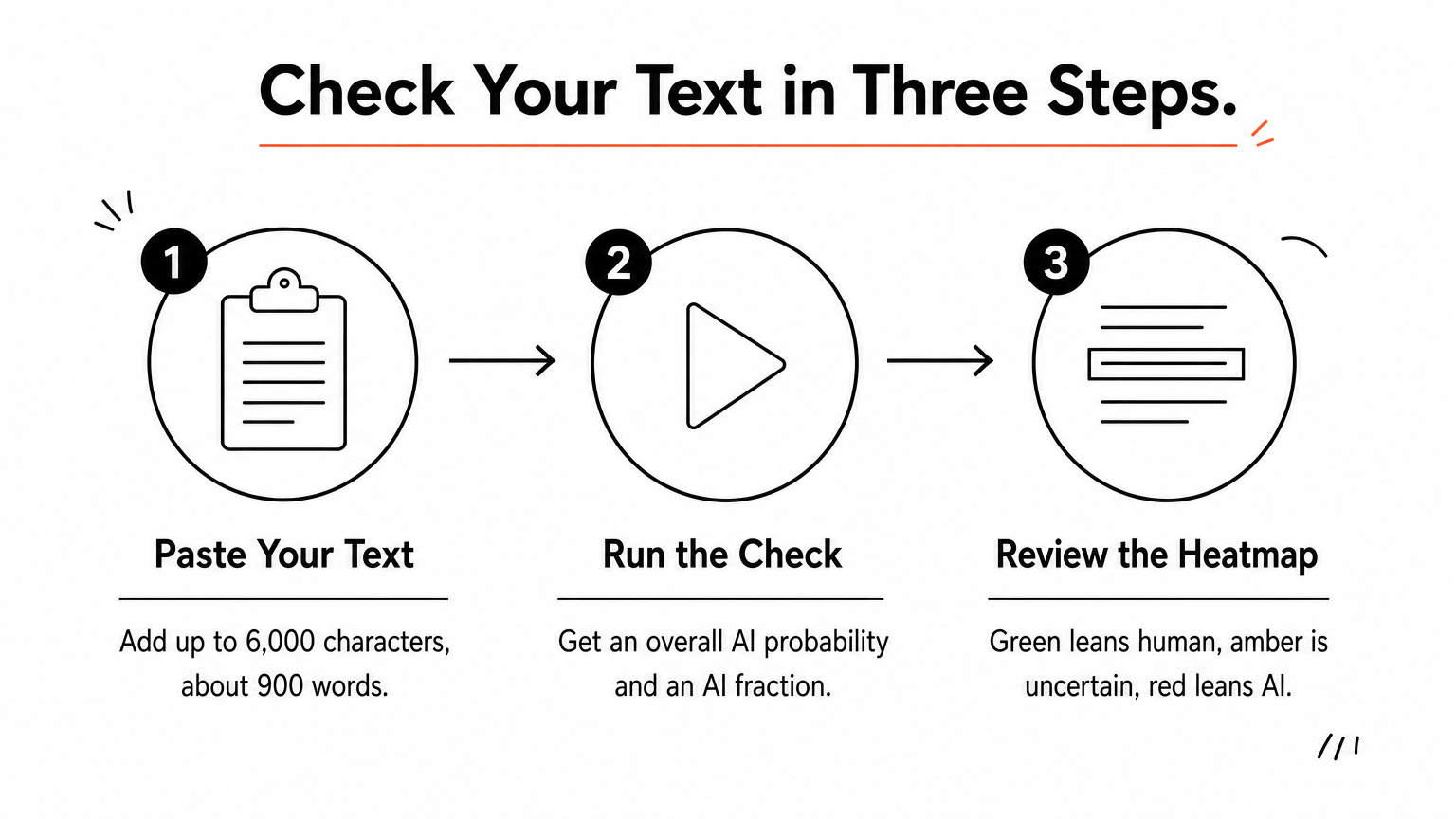
- Paste your text. Add up to 6,000 characters, roughly 900 to 1,000 words. A live counter shows words and characters as you type. No draft handy? Use the sample text button to see how it works.
- Run the check. You get an overall AI probability and an AI fraction, which is the share of sentences scoring 50 percent or higher.
- Review the heatmap. Green sentences lean human, amber ones are uncertain, and red ones lean AI.
Afterward, use Copy results to save the output for your notes, or Clear to start fresh with the next draft.
Get a more reliable result
Length matters most. Any checker for AI needs enough words to find patterns, so paste several full paragraphs, ideally 250 words or more. A two-sentence answer can swing from green to red on one odd phrase, and that tells you almost nothing.
Short text gives noisy scores, so check full paragraphs, not fragments.
Longer papers need splitting. Because of the 6,000-character cap, check essays section by section. Each visitor also gets a daily limit, so save your checks for the drafts that matter.
Privacy deserves a mention too. Your text is not stored on the site. It goes only to the Sapling detection API to produce the result. Still, avoid pasting anything confidential, such as unpublished client work or student records.
How to read an AI score and sentence heatmap
A result from any AI detector comes in two layers, a set of numbers and a colored view of your text. Read them together. The numbers give you the big picture, and the heatmap shows where that picture comes from.
Overall probability versus AI fraction
The overall AI probability is the tool's estimate that the whole text came from a language model. A score of 85 percent does not mean 85 percent of your words are AI. It means the writing closely resembles AI output as a whole.
Separately, the AI fraction counts the share of sentences scoring 50 percent or higher. Picture a 20-sentence essay with a 30 percent overall probability and an AI fraction of 25 percent. Five sentences lean AI, and those five become your revision list. This number helps most with mixed documents, where a person edited AI output or added AI lines to their own draft.
What the heatmap colors mean
| Color | Meaning | What to do |
|---|---|---|
| Green | Leans human | Usually leave it alone |
| Amber | Uncertain | Reread for generic phrasing |
| Red | Leans AI | Compare against your notes or earlier drafts |
Patterns matter more than single sentences. One red sentence in a page of green is often just a plain, common phrase. A long red stretch, especially across several paragraphs, deserves a real look.
A red sentence is a flag to examine, not a finding of guilt.
Turn the colors into action
Next, work through the red and amber sentences one at a time. Read each aloud and ask whether it sounds like you. Generic openings, stacked transitions, and vague claims with no example are the usual culprits. Revise them, then run the check again to see what changed. The next section explains why even a careful reading still has limits.
How accurate AI detectors are and why false positives happen
No AI detector is fully accurate, and any tool that promises 100 percent is overselling. Detectors compare your text with patterns common in machine writing, then return a probability. That makes the result a statistical estimate, not proof of authorship. Accuracy also shifts with text length, topic, and how heavily a draft was edited after generation.
Why false positives happen
A false positive means human writing gets flagged as AI. Language models are trained to produce clear, predictable, well-organized prose, and plenty of people write that way too. Detectors look for low surprise in word choice, so these styles often trigger them:
- Formal academic writing with standard transitions
- Short answers with too little text to analyze
- Technical or legal text with fixed phrasing
- Work by non-native English writers who stick to simple, safe vocabulary
Research backs this up. A 2023 Stanford study found that several detectors labeled more than half of TOEFL essays by non-native speakers as AI-generated. That is why non-native writers face the highest risk, and why a reviewer should be most careful with their work.
Why detectors miss AI text too
Errors run in both directions. A writer who paraphrases AI output heavily or edits it line by line can push a score toward green. Models also change their style over time, so any AI text checker lags a little behind the newest releases. OpenAI withdrew its own AI classifier in July 2023, citing a low rate of accuracy.
A green result does not prove a human wrote the text, and a red result does not prove an AI did.
How to use a score responsibly
Treat the score as one signal among several. Compare it with earlier drafts, notes, and the writer's past work, and rerun the check on longer passages before you trust a surprising result. If the stakes are high, never decide on a score alone. Talk to the writer first.
False positives are also the best reason to run a check on your own draft. If a sentence you wrote yourself shows up red, you can fix it, and the next section shows how.
How to revise flagged sentences in your own words
Revision is where a sentence-level heatmap pays off. Your goal is not to trick an AI detector. It is to make each flagged line say something specific, in a voice that belongs to you. Start with the red sentences, then move to amber, and leave the green ones alone.
Rewrite from the idea, not the wording
Swapping synonyms rarely helps, because the sentence structure stays the same. Instead, cover the flagged sentence and say the point out loud, as if you were explaining it to a friend. Write down what you said, then add one detail only you could supply, such as a number, a class discussion, or a source you actually read.
| Flagged (red) | Revised |
|---|---|
| Social media has had a significant impact on the way students communicate. | Most of my classmates text before they talk, and group chats now decide who studies together. |
Use this quick routine on each flagged line:
- State the point in one plain sentence.
- Add a concrete example, name, or number.
- Cut stacked transitions like "Moreover" and "Furthermore".
- Mix short and long sentences so the rhythm sounds like speech.
Recheck, then know when to stop
Once you finish, run the revised section through the checker again. Compare the new heatmap with the old one. Fewer red sentences usually means your wording got more specific, which is the real improvement.

Do not chase a perfect all-green page, though. Short, factual sentences like a date or a definition can stay amber no matter how you phrase them, and rewriting them into awkward prose makes your writing worse.
Revise for clarity and your own voice, not to beat a score.
If a sentence you wrote yourself stays red, leave it. Keep your outline, notes, and earlier drafts instead. Version history in Google Docs or Word shows how a paper grew over time, and that is far stronger evidence of authorship than any AI writing checker can give you.
Use the score as a starting point
An AI detector gives you a statistical estimate, not a verdict. The overall probability shows the big picture, the heatmap shows which sentences drive it, and both come with real limits. Short, formal, and non-native English writing can score red even when a person wrote every word.
The best habit is simple. Check full paragraphs, read the colors together, and revise flagged lines in your own words with a specific detail only you could add. Keep your notes and drafts as proof of your process. Teachers and editors should treat a high score as a reason to ask questions, never as the final word.
Ready to see how your own writing reads? Paste your text into the free AI detector and get a score with sentence-level highlights in seconds, with no signup needed, then learn how to read your AI detection score.
